Microsoft 365 License Optimization & Governance System v1.0
Microsoft 365 License Optimization & Governance System v1.0
- SECURE CHECKOUT
- INSTANT DOWNLOAD
- QUALITY ASSURED
- EMAIL SUPPORT
PRODUCT DETAILS
PRODUCT DETAILS
Reconcile Microsoft 365 license assignments, review reported activity, and document follow-up decisions in a downloadable Windows Excel workbook.
Built for IT administrators, service teams, MSPs and consultants who need to gather evidence for a Microsoft 365 license review.
What you can review
- Reconcile licensed and unlicensed accounts against the user inventory. Identify blocked accounts that still carry licenses and investigate them before making changes.
- Review recorded Exchange, OneDrive, SharePoint and Teams activity alongside source dates and coverage. Inspect listed administrative role assignments when the optional Roles export is available.
- Record each decision, rationale, owner and review date against the tenant and User object ID, so follow-up stays with the account when export order changes.
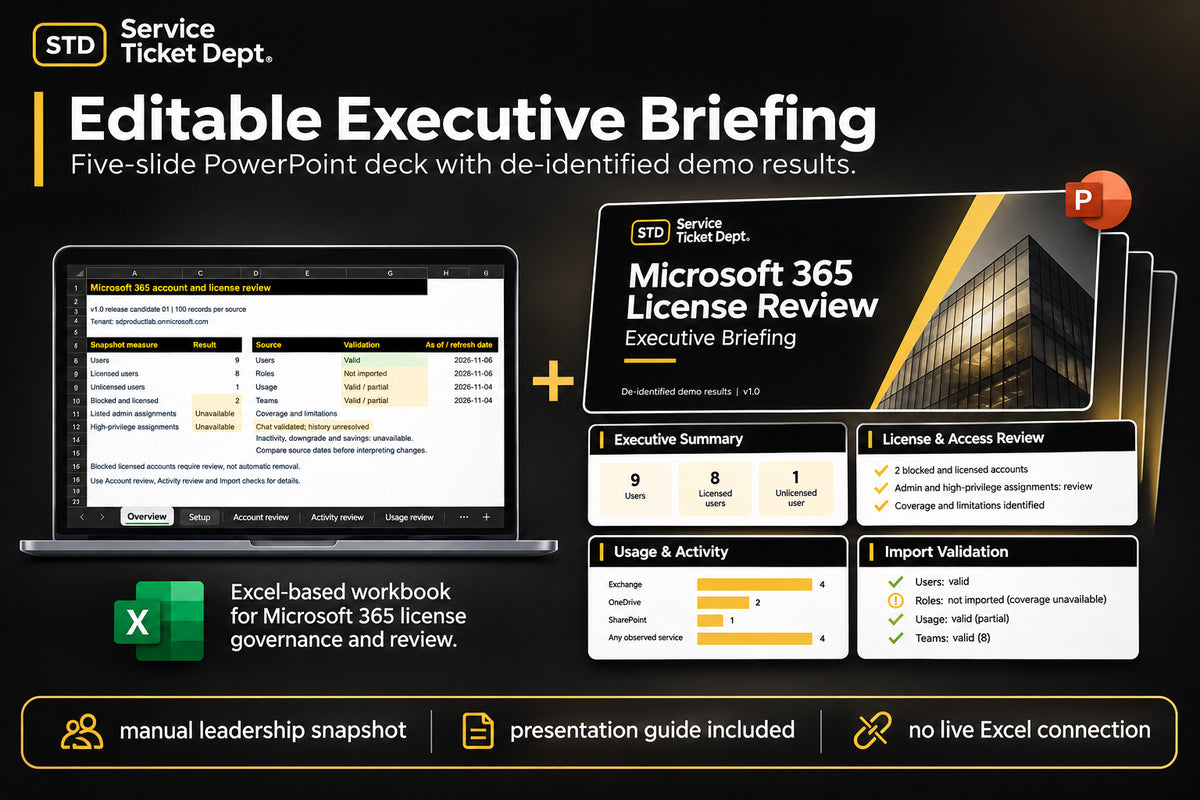
- Brief leadership using the editable five-slide PowerPoint and the guide for transferring validated workbook results.
What's included in the ZIP
- Clean branded Excel workbook (.xlsx) with protected formulas and empty operational inputs.
- User Guide, README, Release Notes, License Terms and Executive Presentation Guide (PDFs).
- Editable five-slide Executive Briefing (.pptx) with de-identified demonstration results.
Requirements and tested profiles
- Use Windows desktop Excel with calculation set to Automatic. Collect CSVs from the same tenant, use activity exports with identifiable usernames for matching, and keep the original headers. Validate imports before reviewing results.
- Required Users import uses the 30-column Microsoft 365 admin center Active users inventory. The tested inventory profile covers Microsoft 365 Business Standard and Unlicensed.
- Required Usage import uses the 24-column Office365ActiveUserDetail CSV from the Username detail table under Reports > Usage > Microsoft 365 apps > Active users. The selected reporting period can be 7, 30, 90 or 180 days.
- Optional Roles import uses the 12-column Microsoft Entra role assignments CSV. Tested direct-user roles are Global Administrator and Reports Reader.
- Optional Teams import uses the 34-column Microsoft Teams User activity detail CSV from the individual-user table.
- Each import source supports 100 data records, excluding the header. Each role assignment uses one record. Other license labels and report schemas require compatibility review.
Scope and reporting coverage
The workbook summarizes supplied evidence for human review. Coverage is partial and depends on the source and reporting window. A blank activity date or zero count does not establish inactivity. Tenant changes and license assignments remain with your authorized team. v1.0 provides no effective-access determination, inactivity certification, downgrade recommendations or savings calculations.
License and support
The included License Terms cover use within one purchasing organization or consulting/service-provider business. MSPs and consultants may use the product across multiple direct client engagements and share completed client-specific reports, exported results and presentations, including editable completed presentations. Blank templates and reusable source files remain restricted, including populated workbooks that retain reusable formulas, controls or operational structure. A client who needs its own operational workbook must obtain its own license unless Service Ticket Dept grants written permission.
For download access, basic product questions and general usage guidance, email support@serviceticketdept.com.
FAQ
Which Excel version do I need?
Use Windows desktop Excel with Automatic calculation enabled.
Which imports are supported?
Use the tested Microsoft 365 Users inventory and Active Users detail CSVs. The Entra role assignments and Teams User activity detail CSVs are optional. Use the exact profiles above.
How much data can I import?
Up to 100 data records per import source, excluding the header. For Roles, count each assignment as a separate record.
What does the workbook measure?
It summarizes accounts, assigned licenses, blocked accounts with licenses, observed service activity and listed role assignments where supplied. It distinguishes a recorded date, no recorded date, no matching row and unavailable coverage.
Digital download · ZIP package
Professional. Tested. Working As Intended.
DELIVERY & SUPPORT
DELIVERY & SUPPORT